F2. How to purchase
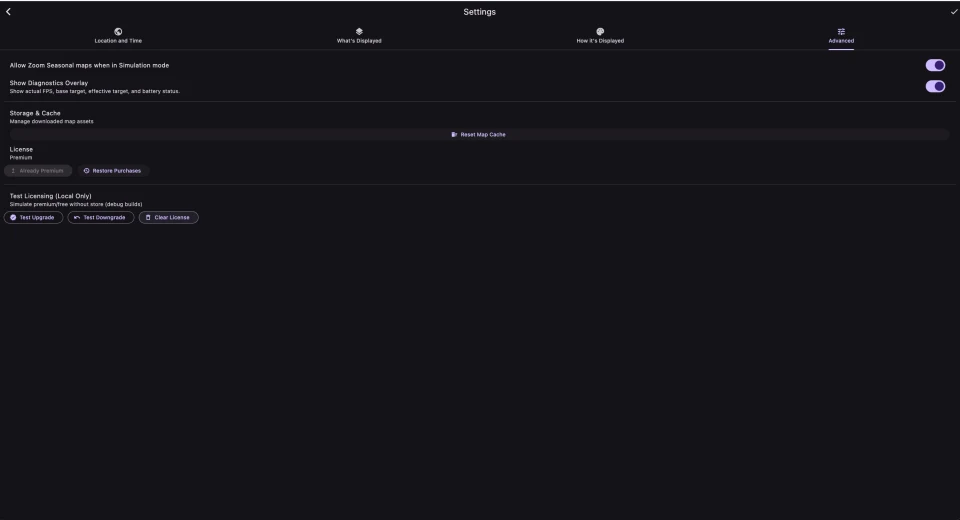
In Settings → Advanced, find the License section. It shows your current state — Free, Premium, or Purchase pending approval — and an Upgrade to Premium button. If the store has finished loading prices, the button shows the price (for example, "Upgrade to Premium — $4.99"); otherwise it just says "Upgrade to Premium".
Tap it and the platform's standard purchase sheet appears (Apple's on iOS, Google's on Android). Premium is a one‑time purchase, not a subscription. After purchase, the license tile updates to "Premium" and every premium feature unlocks immediately.
Desktop builds do not currently offer in‑app purchase.
F3. Restoring purchases
If you reinstall the app, or sign in with the same Apple ID / Google account on a new device, your Premium licence comes with you. There's a Restore Purchases button next to Upgrade to Premium in Settings → Advanced; tap it and the app queries the store.
On Android, the app also opportunistically reconciles in the background (when it's safe to do so without prompting you), so most of the time you don't need to press Restore manually.
On iOS, Apple requires that restoring is always user‑initiated, so you do need to press Restore yourself after reinstall.
F4. Pending purchases
If you're using a parental‑approval account or a deferred‑payment method, your purchase can land in a Purchase pending approval state. The license tile in Settings reflects this. The features stay locked until approval comes through; when it does, the licence flips to Premium automatically and you don't need to do anything.